Organisation structure
MLM Genealogy Software
Genealogy screens fail in a predictable order: fine at five hundred positions, slow at fifty thousand, unusable at half a million. The cause is always one of two decisions — loading a tree instead of a node, or computing volume on view instead of on write.
What you get
Outcomes operators report after moving onto the platform.
Subtree paging, not tree loading
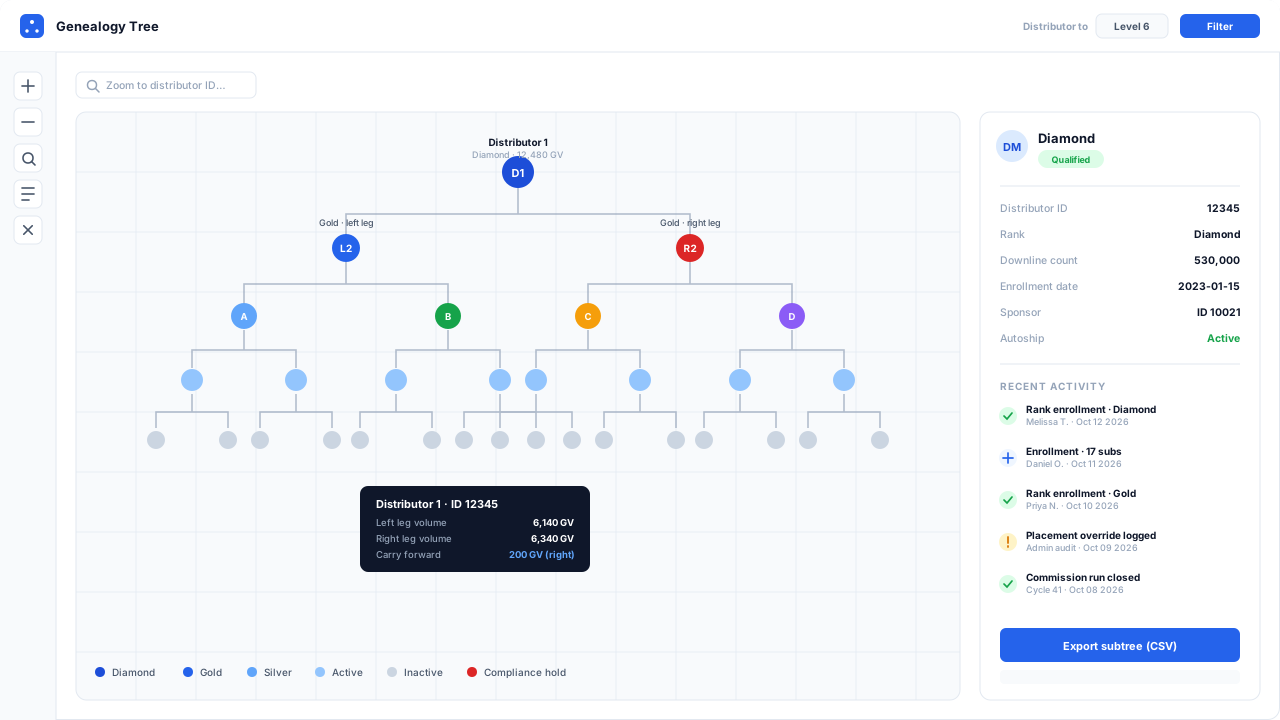
The server returns the requested node and its immediate descendants. Cost is bounded by what is on screen, not by the size of the organisation.
Volume materialised on write
Personal, group and leg volume are computed as orders post, so the tree reads precomputed numbers instead of aggregating a subtree per expansion.
Placement and sponsorship trees
Both maintained independently and both viewable, because in a binary or matrix the person above you is frequently not the person who recruited you.
Jump to any position
Search by name, ID or email and land on that node with its ancestry path intact, instead of expanding forty levels to find someone.
Overlay the number you care about
Switch the node label between personal volume, group volume, rank, activity status, join date or leg balance without reloading the tree.
Visibility controlled by policy
Structural depth and contact-detail access set per rank, so a leader can lead their organisation without the whole field holding everyone's phone number.
MLM Genealogy Software
Interactive genealogy tree with rank badges, distributor detail panel and recent enrollment activity feed
The two decisions that determine everything
A genealogy view is a tree of potentially hundreds of thousands of nodes, each carrying aggregate numbers computed from everything beneath it. There are two ways to build it, and the difference only becomes visible once you have a real organisation.
Load the tree, or load the node. A screen that requests a distributor’s downline and renders it works beautifully in a demo with two hundred seeded positions. At fifty thousand it takes fifteen seconds and freezes the browser. The alternative is to request one node and its immediate children, and to fetch deeper levels as they are opened — so a query costs what is on screen, regardless of whether the organisation has a thousand positions or a million.
Compute volume on view, or on write. Group volume is the sum of everything below a node. If that sum is calculated when the tree is displayed, every node expansion is a recursive aggregate over a subtree, and the cost compounds with depth. If it is maintained as orders post — each order incrementing the roll-ups of every ancestor — then displaying a node reads a column.
Both decisions are made here in the second direction. The result is the figure in the specs above: 250,000 positions, depth 60, sub-second subtree loads. Ask any vendor for their equivalent number and the conditions it was measured under, because “real-time genealogy” is claimed universally and means nothing.
Two trees, and why it is not a redundancy
In a unilevel, placement and sponsorship are the same relationship and one tree suffices. In a binary, matrix or forced matrix they diverge immediately:
| Placement tree | Sponsorship tree | |
|---|---|---|
| Parent is | the position you sit under structurally | the person who recruited you |
| Width | capped by the plan | unlimited |
| Determines | team commission, cycles, level payout | fast start, matching bonus, personal qualifications |
| Changes | only by an audited move | never |
Both are authoritative for their own components, and neither is derivable from the other. This is covered from the compensation side on the binary plan page; from the genealogy side it means the tree view has a toggle, and every node shows its parent in both structures.
What you can put on a node
A genealogy view is only useful if it shows the number you are currently investigating. The node label switches between personal volume, group volume, leg volume, rank, activity status, join date, last order date and pending qualification — without reloading the tree.
That list is deliberately mundane, and it is what turns the tree from a diagram into a tool. “Show me this organisation coloured by last order date” answers a retention question in one screen that otherwise takes an export and a spreadsheet.
Any subtree exports to CSV with the chosen columns, subject to the operator’s own visibility permissions — so an export cannot leak contact details that the interface would have hidden.
Moves: legitimate, and deliberately hard
Position moves are necessary. A placement error caught in the first week, a documented distributor transfer, a duplicate account merged. They are also the most disputed administrative action in this industry, because moving a position changes the income of everyone above it.
The controls, therefore:
- a mandatory reason on every move,
- an approval queue with a second approver where you configure one,
- a full audit record — who, whom, from, to, when, why,
- and no retroactive recalculation. A move affects future runs. Closed periods stay as they were paid.
That last rule is the one worth checking with any vendor. A system that recalculates history after a move will silently change what a past statement says, and the first person to notice will be a distributor whose commission for last March is now different.
At a glance
| Tested scale | 250,000 positions at depth 60 with sub-second subtree loads |
|---|---|
| Views | Tree, list and table, each honouring the same visibility rules; tree supports horizontal and vertical orientation |
| Trees maintained | Placement tree and sponsorship tree, independently, with a toggle between them |
| Node overlays | Personal volume, group volume, leg volume, rank, activity status, join date, last order date, pending qualification |
| Position moves | Supported with mandatory reason, approval queue and full audit record; historical commission runs are never altered |
| Export | Any subtree exports to CSV with the chosen overlay columns, respecting the operator's visibility permissions |
Questions operators ask before they switch
Straight answers on plan mechanics, migration risk and compliance. If yours is not here, ask us directly.
Why do genealogy screens get slow?
Why are there two trees?
Can positions be moved after enrolment?
How much of the downline should distributors see?
Ready to Transform Your Direct Selling Business?
Send us your plan rules and we will run a live commission cycle against them, on your numbers, before you commit to anything.
- Configured in a sandbox before the call, usually within two business days
- No slide deck and no card — you watch your own plan pay out
- Your plan document stays confidential and is deleted on request
Prefer email? Write to us at sales@mlmsoftwarepro.com