Operations console
MLM Back Office Software
Back office means two different products with one name. The corporate console runs the business — commission runs, approvals, compliance, refunds. The distributor console answers four questions, over and over, on a phone. Building them as one interface with permissions is the mistake that produces both a confusing admin tool and a distributor experience nobody uses.
What you get
Outcomes operators report after moving onto the platform.
Two consoles, one data model
Corporate and distributor interfaces designed separately for genuinely different jobs, reading the same records so they cannot disagree.
Runs with a preview mode
Any commission run executes against live data without posting, producing the full output and cost breakdown. Approve, then post.
Permissions that hold up in an audit
Role-scoped access with a record of who changed what, when, and what the value was before. Including plan rule changes.
Distributor console built for a phone
Server-rendered, no app required. Volume, team, statements, wallet and replicated-site settings work on mobile data.
Approval queues, not inboxes
Payout batches, refunds above a threshold, replicated-site content and distributor transfers each queue with a reason and a second-approver option.
Everything exportable
Any list view exports to CSV. Any entity exports in full via API or scheduled bucket delivery.
MLM Back Office Software
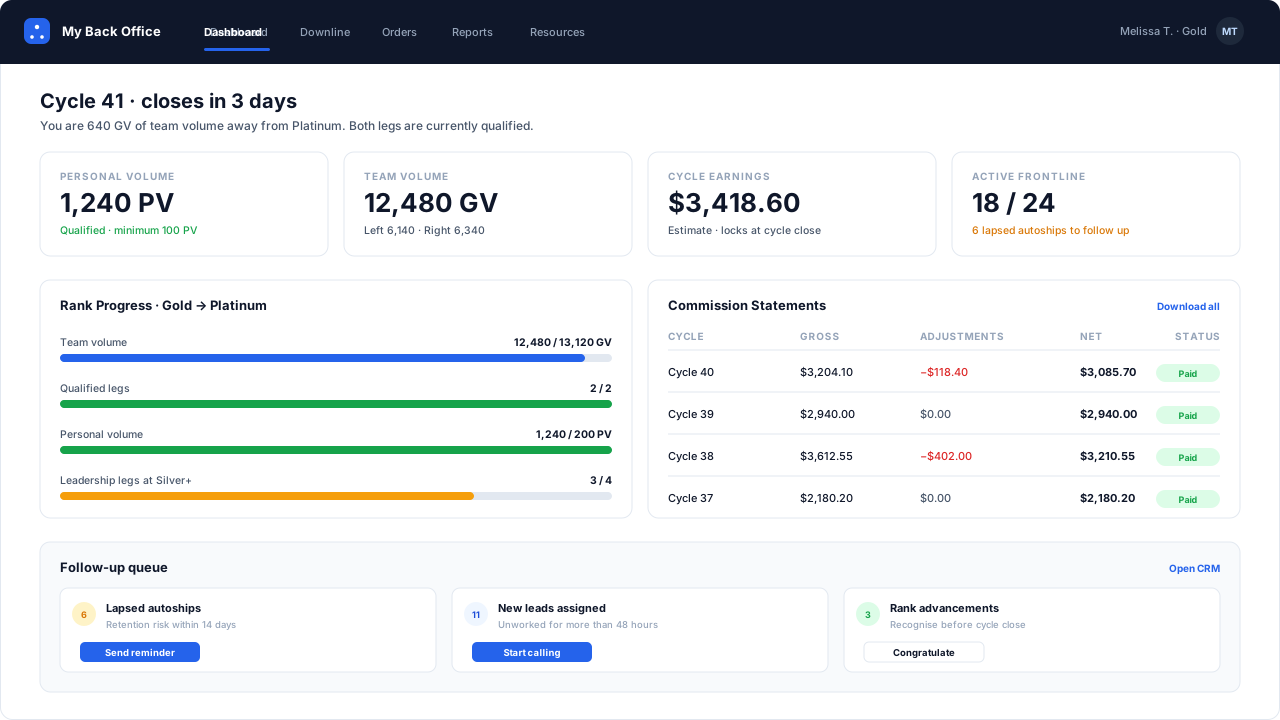
Distributor back office showing personal volume, team volume, rank progress and commission statements
One name, two products
“Back office” in this industry means either of two things, and vendors rarely say which.
The corporate back office is where the business is run: commission runs, payout approvals, refunds, distributor records, plan configuration, compliance review, reporting. A dozen workflows, used by a handful of people, on desktops, at length.
The distributor back office is where a representative checks their volume, their team and their money. Four workflows, used by thousands of people, on phones, in a hurry.
Designing one interface to do both is the most common architectural shortcut in this category and it fails in a specific way: the corporate views inherit distributor-friendly framing that makes bulk operations awkward, and the distributor views inherit fields that only mean something to a compliance officer. Both audiences conclude the software is not for them.
The corporate console
The workflow that matters most is the commission run, and it has three modes for a reason.
| Mode | Posts to wallets | Visible to field | Used for |
|---|---|---|---|
| Preview | no | no | reviewing cost and spotting anomalies before committing |
| Provisional | no | yes | letting the field see indicative numbers mid-period |
| Final | yes | yes | the payable, locked run |
Preview is the one to insist on in an evaluation. It executes against live data and produces the complete output — every line for every distributor, the total, the ratio — without posting anything. The value is not theoretical: plan misconfigurations are common, they are usually obvious in an aggregate view, and finding one before the field sees the numbers costs an hour instead of a month of credibility.
Approvals are queues, not emails. Payout batches, refunds over a threshold, replicated-site content, distributor transfers between sponsors — each queues with the reason, the requester and an optional second-approver requirement. An approval that happens over email is an approval you cannot evidence.
The audit trail includes configuration. Most systems log distributor and order changes and store plan rules as current state. That is exactly backwards for dispute handling: the question “why did my commission change” is very often answered by a rate change nobody recorded. Rule and threshold changes are logged here with before and after values, and the commission engine versions the rule set with each run so history stays reproducible.
The distributor console
Four things, done properly, on a phone:
Volume and rank. What is required, what is achieved, what is missing. Including when the rank is not reachable this period — an honest gap is better than an encouraging projection that the commission run will contradict.
Team. Who is active, who lapsed, who is close to qualifying, and where the organisation is growing. Structural visibility to full depth; contact details limited by policy and unlocked by rank. The genealogy page covers the tree itself.
Statements. A total that expands into lines, each showing the order, the rule, the rate and the level or leg. This single feature removes most commission tickets, because most tickets are comprehension rather than error.
Money. Balance, pending, next payout date, and the specific reason for any hold. “Pending” with no reason generates a support contact every single time.
Everything else — training, marketing assets, messaging, recognition — is worth having and is not what earns the field’s trust. Those four are.
Security, stated plainly
Two-factor authentication is available on every role and mandatory for any role that can approve a payout. Roles are configurable with per-module read, write and approve permissions, and there is a read-only auditor role that can see everything and change nothing — which is what you hand to an external auditor rather than sharing an administrator login, as still happens more often than anyone admits.
At a glance
| Corporate modules | Distributors, genealogy, orders, commission runs, ranks, wallets, payout batches, catalogue, content approval, compliance flags, reports |
|---|---|
| Distributor modules | Volume and rank progress, team view, orders, commission statements, wallet and payouts, replicated-site settings, training library |
| Run modes | Preview (nothing posted), provisional (visible, not payable), final (payable and locked) |
| Audit coverage | Every write recorded with actor, timestamp, before and after values — including plan rule and rank threshold changes |
| Roles | Configurable role definitions with per-module read, write and approve permissions, plus a read-only auditor role |
| Session security | Two-factor authentication available on all roles, mandatory for roles with payout approval |
Questions operators ask before they switch
Straight answers on plan mechanics, migration risk and compliance. If yours is not here, ask us directly.
Why separate the corporate and distributor consoles?
What should a distributor console actually contain?
Can we preview a commission run before paying it?
What does the audit trail cover?
Ready to Transform Your Direct Selling Business?
Send us your plan rules and we will run a live commission cycle against them, on your numbers, before you commit to anything.
- Configured in a sandbox before the call, usually within two business days
- No slide deck and no card — you watch your own plan pay out
- Your plan document stays confidential and is deleted on request
Prefer email? Write to us at sales@mlmsoftwarepro.com